Apps & tools
Software I’ve built, for creators and editors.
Tools I made to speed up my own edits, from AI captions to a vertical video editor, plus web apps for everyone else.
Live product
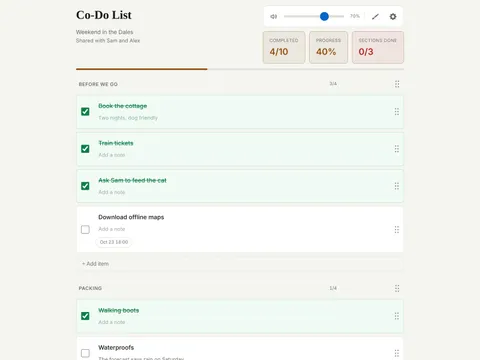
Co-Do List
A shared checklist you can shape however you like. Ticking something off is satisfying on purpose: the box fills, the progress bar moves, and clearing a section sets off a celebration sound and fireworks. Share a list with other users and you can all see every change the moment it happens, on every device.
It was born as a startup business checklist built for one person and grew into a full product with accounts, live sync, deadline reminders on your phone, a calendar feed your own calendar app can subscribe to, task timers, and lists you can paste in from anywhere. It installs to a phone’s home screen like a native app and works offline.
Built with Claude Code, imagined by me.
- Live product
- Web app (PWA)
- Supabase
- Netlify
- Push notifications
MusicLinx, ScreenLinx & GameLinx
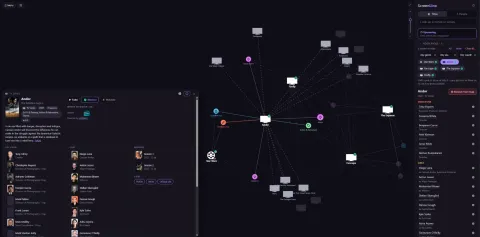
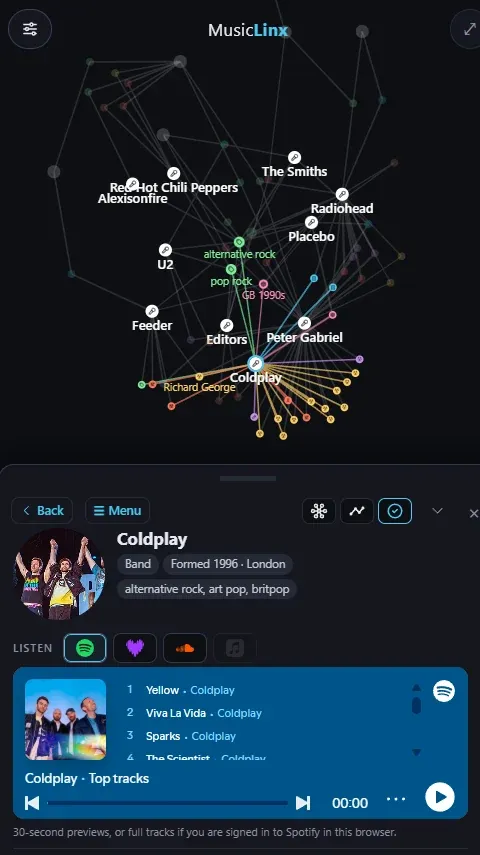
A web of your taste. Pick the artists, films or games you love and each app reads who made them: the producers, engineers and session players behind a record; the directors, writers, composers and effects teams behind a film; the designers, composers and studios behind a game. It then draws the threads your picks share as an interactive map and suggests new things along those threads.
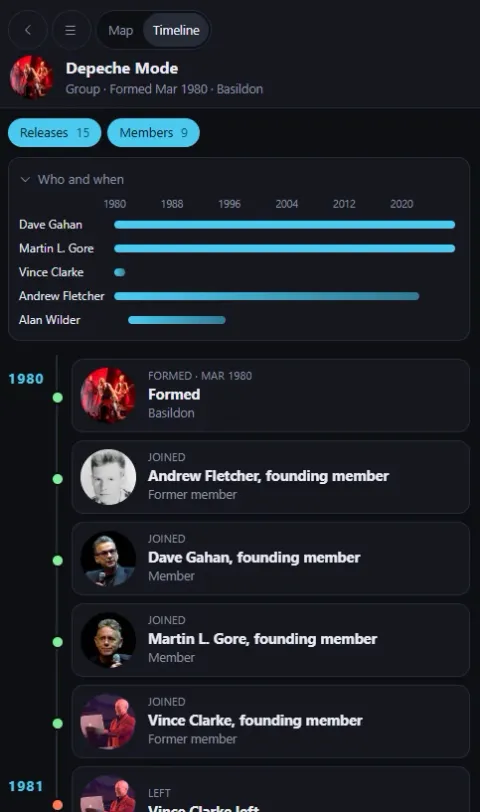
- MusicLinx uses MusicBrainz and ListenBrainz, imports from Last.fm and Spotify, and plays previews right in the app. A timeline view shows who was in a band and when.
- ScreenLinx uses TMDB with where-to-watch from JustWatch, and imports from Letterboxd, IMDb, Netflix and Trakt.
- GameLinx uses RAWG and Wikidata, imports your Steam library, and links “Play in browser” for older games the Internet Archive hosts.
All three share one design and codebase lineage, install like an app, and come as a single file that runs offline.
Built with Claude Code, imagined by me.
- React
- TypeScript
- Force-directed graphs
- Installable web app
Editing tool
MagiCC
Captions, like magicc.
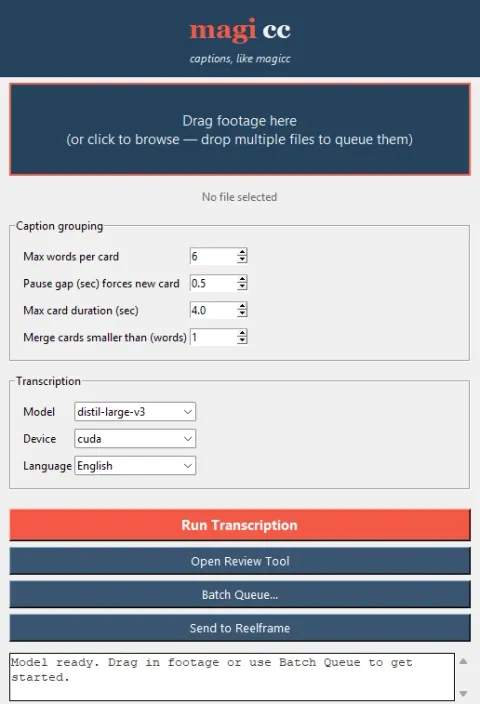
The problem. Captioning short-form video was the slowest, most repetitive part of my editing workflow. Native tools produce phrase-level timing, so animated word-by-word captions meant hand-keyframing every word in After Effects, video after video.
The solution. A local captioning pipeline in three parts:
- Transcription. A desktop app runs WhisperX on my GPU to produce word-accurate timestamps, then groups the words into readable caption cards. It supports drag-and-drop, batch queues and multiple languages.
- Review. A browser-based editor plays the footage alongside the transcript. I can fix misheard words, insert missed ones, re-time by tapping along to the audio, tag speakers, and export JSON or SRT. Its transport controls follow standard editing conventions (JKL shuttle, frame stepping).
- Animation. A script turns the reviewed transcript into After Effects markers. A single expression-driven rig reads them and handles pop, karaoke, fade, blur and slide styles, with colour, timing and transition speed on one set of sliders.
The finished captions can also be sent straight into ReelFrame with the footage already loaded.
The result. Captioning went from hand-keyframing every word to a transcribe, review and import workflow. A new style is now a dropdown choice, and the rig carries across every video and aspect ratio.
Built with Claude Code, imagined by me.
- Python
- WhisperX
- Vanilla JS
- ExtendScript
- After Effects expressions
Editing tool
ReelFrame
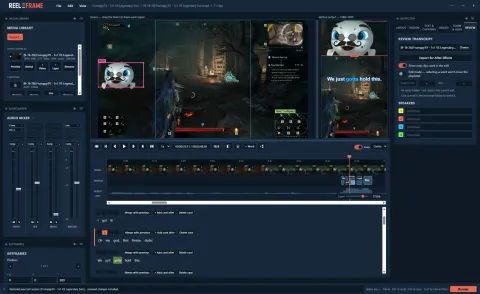
Friction-free landscape to vertical. Built as a way for creators to reframe 16:9 footage into vertical shorts. A timeline editor lets you cut clips, stack two framings with an adjustable split, float extra regions such as a facecam or in-game UI elements, keyframe pan and zoom, set speed, add crossfades and sound effects, and balance it all on a built-in audio mixer.
Captions are built in. Transcripts arrive from MagiCC with the footage already loaded. The Review panel shows them as editable cards synced to a word track on the timeline: fix a word, merge or add cards, and assign speakers. Word-by-word animation, including pop and karaoke styles with a colour per speaker, is rendered straight into the video.
The editor runs in the browser and saves a simple project file; the back end turns that into a single ffmpeg render. Reframing for social is slow and fiddly in a traditional NLE, so I built the tool I wanted.
Built with Claude Code, imagined by me.
- Python
- Flask
- ffmpeg
- Vanilla JS
Premiere Pro panel
The CDominator
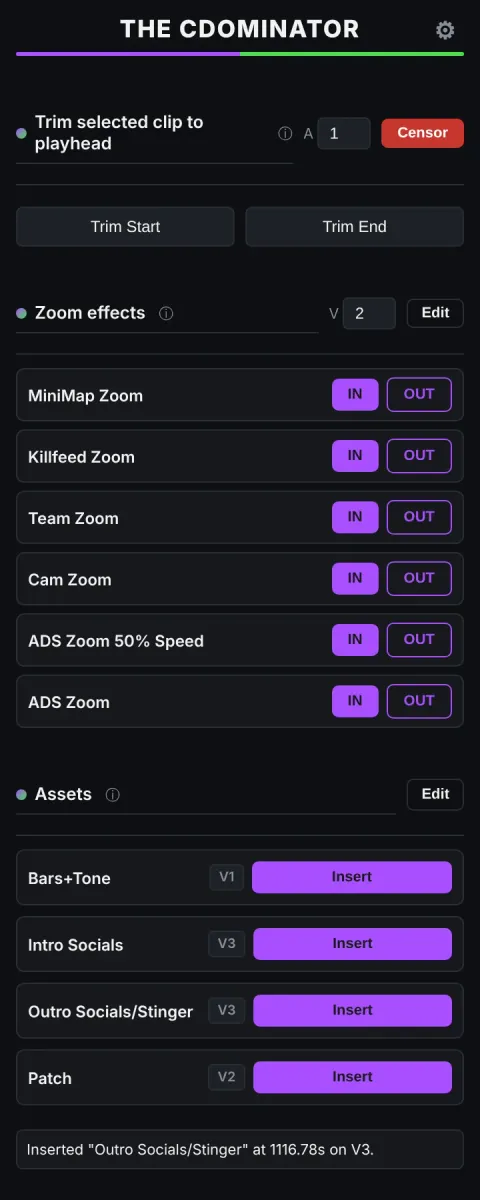
A Premiere Pro automation panel, built for gaming client C Dome. Their high-volume PUBG edits lean on the same handful of moves over and over: zoom punches onto the minimap or killfeed, dropped-in overlays, censor bleeps. Each one is a fiddly multi-step chore by hand, repeated hundreds of times per video.
The panel collapses each into one click. A zoom effect inserts an adjustment layer, applies a Transform and lays down eased keyframes at frame-accurate timing in a single press. Reusable elements (bumpers, bars and tone, patch notes) insert at the playhead from named slots. There’s a one-tap censor bleep, trim-to-playhead tools, and drag-to-reorder throughout.
Most of the work was fighting Premiere’s scripting limits: effects can only be added through an undocumented API, adjustment layers can’t be created by script at all (so they’re pulled from a template), and position values had to be normalised to stay correct at any resolution. Asset links persist per project and re-link themselves when you switch projects.
The result: a repetitive, error-prone routine becomes a few clicks, keeping the edit moving at the pace of the ideas rather than bogged down by the software and mundane repetitive actions.
Built with Claude Code, imagined by me.
- Premiere Pro
- CEP panel
- ExtendScript
- QE API
Have an idea? Let’s build it.
I build tools for creators and small teams, from Premiere workflow plugins to full web apps. If something in your workflow is slow, repetitive or missing, let's talk about building it.